
Minesweeper looks like a game of luck. You click a gray square and either it opens or you lose. In fact most of the game is pure logic: every number on the board is a clue, and on an easy board you can usually clear every square without ever guessing. Usually, but not always.
This guide covers the rules, how to read the numbers, and two patterns that get you out of stuck spots. Then it answers the questions players argue about: how often you are forced to guess, and whether your first click should go in the corner or the middle. We answered them by playing 360,000 boards with a computer player that never guesses unless it has to.
Play it here: Mine Finder in Game Attic, free in your browser, with five board sizes from Easy to Master and no sign-up. Your first tap is always safe, and every board can be solved without guessing.
How to play Minesweeper
The board is a grid of covered squares. Some of them hide mines. Your job is to open every square that is not a mine.
- Click a square to open it. If it hides a mine, the game is over.
- A number tells you how many mines touch that square. "Touch" means the eight squares around it: above, below, left, right and the four corners. A 1 means exactly one of those eight is a mine. A 3 means three.
- A square with no mines around it opens its neighbours for you. These are the 0 squares. The game shows them as blank and opens everything around them, which is why one click can clear a big patch.
- Right click to plant a flag on a square you know is a mine. Flags are only notes for you. They stop you from opening that square by accident.
- You win when every safe square is open. You do not have to flag the mines.
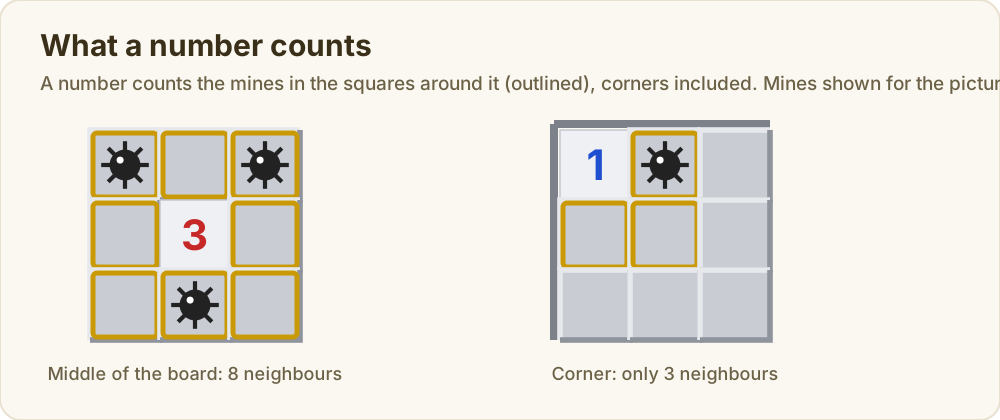
A square in the middle of the board has eight neighbours. A square on the edge has five, and a corner square only three. Keep that in mind, because it comes back when we get to the first click.
The three standard sizes, as in Windows XP and most versions since, are:
| Level | Board | Mines | Share of squares that are mines |
|---|---|---|---|
| Beginner | 9 by 9 | 10 | 12% |
| Intermediate | 16 by 16 | 40 | 16% |
| Expert | 30 by 16 | 99 | 21% |
Your first click is always safe. Many versions today, including Google's and most Minesweeper websites, go further and make sure the first click lands on a 0, so it always opens a patch of board. The classic Windows game only promised that the first click would not be a mine. That small rule change turns out to matter a lot, as you will see below.
Reading the numbers
Here is a real beginner board, one click in. We clicked the top left corner. It was a 0, so the game opened that corner and kept going until it hit numbers.
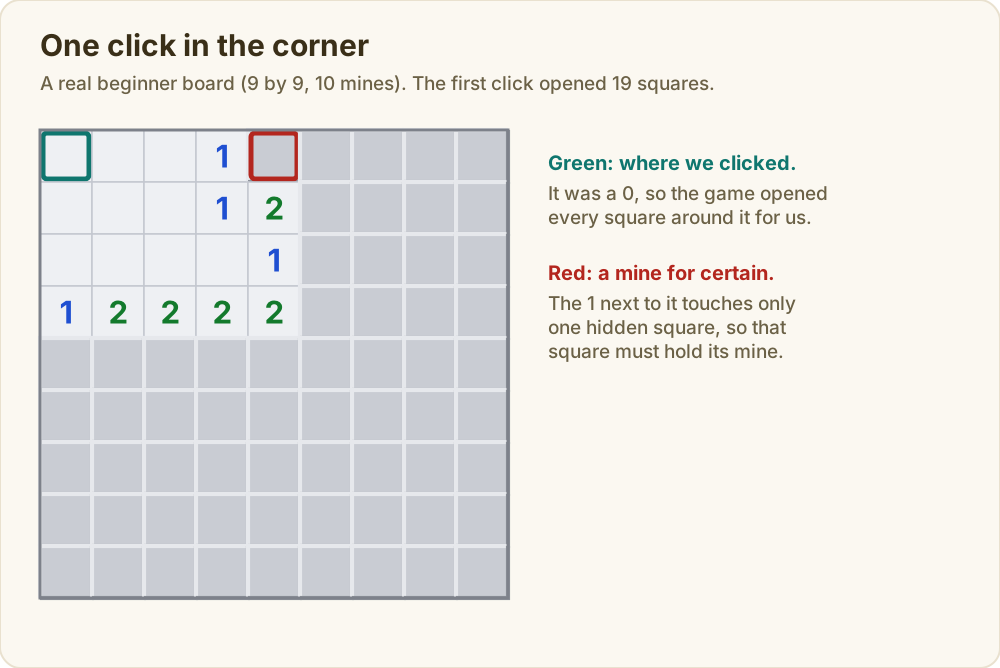
Look at the 1 in the top row. Of its neighbours, only one square is still covered: the one to its right, outlined in red. The 1 says one mine touches it, and there is only one place for that mine. So that square is a mine. Flag it.
That is the first rule of reading the board: if a number has exactly as many covered squares around it as its value, they are all mines. The second rule is the other way round: if a number already touches as many flags as its value, every other covered square around it is safe. Once you flag that red square, any 1 that touches it is "full", and you can open everything else next to that 1.
Almost every move you make on an easy board is one of those two rules.
Two patterns worth learning
Sometimes neither rule works on a single number, but two numbers side by side settle it.
The 1-1 against a wall. Picture a row of 1s along the edge of an open area, with covered squares on the other side. The first 1 at the end of a wall touches only two covered squares, A and B. The 1 next to it touches A, B and C. Both 1s need one mine, and the first one says that mine is in A or B. So the second 1 already has its mine among A and B, and C must be safe.
The 1-2-1. A row reading 1, 2, 1 with covered squares above it, the kind you see along a flat edge. The mines are always above the two 1s, and the square above the 2 is safe. Try putting a mine above the 2 instead: then each 1 already has its mine, nothing else can be a mine, and the 2 only gets one. So that square is safe, and the 2 needs both squares above the 1s.
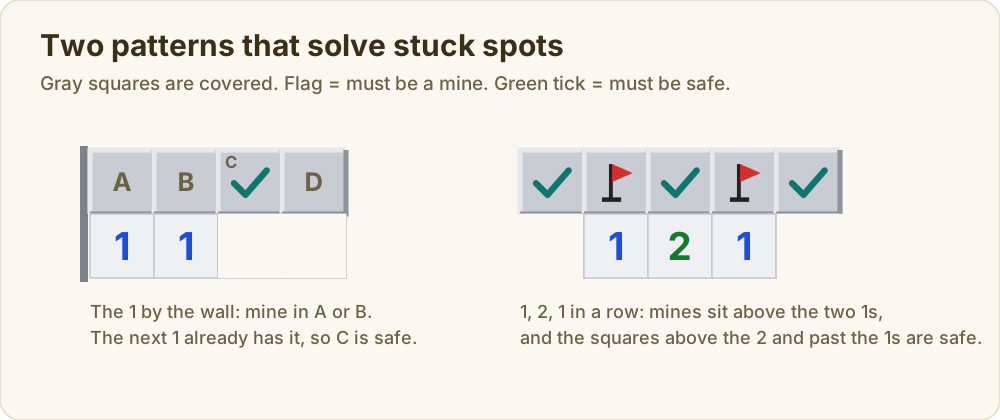
Both patterns are the same idea: compare what two numbers share and what each one has to itself. Our computer player uses exactly that, plus one more step for the hard spots. When nothing else works, it tries every possible way to place mines in the covered squares next to the numbers, keeps only the layouts that fit every number and the total mine count, and opens any square that is safe in all of them. If no square is safe in all of them, the player is stuck. That is a forced guess.
How we checked
We wrote a Minesweeper player that follows the rules above in order: single numbers first, then pairs of numbers, then every possible layout of the squares next to the numbers, counting the mines left on the board. It only guesses when none of those finds a safe square, and then it picks the square with the lowest chance of being a mine, worked out exactly from the same layouts.
It played 20,000 random boards for every combination of level (beginner, intermediate, expert), first click (corner, middle of an edge, middle of the board) and first click rule (always a 0, or only safe). That is 360,000 games. On 0.5% of expert games the covered area next to the numbers grew too big to try every layout, and there the player guessed, so the expert numbers are a little low. The script and its output are saved with this post. A "logic only" board below means the player cleared it with no guess at all.
How often logic alone is enough
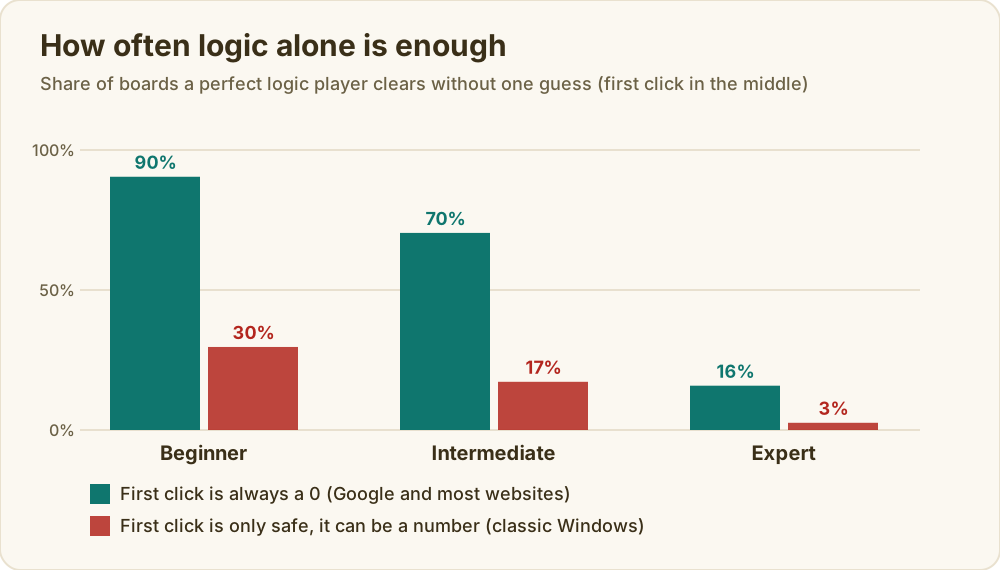
With today's rule, where the first click always opens a patch, 90% of beginner boards can be cleared by logic alone. On intermediate it is 70%. On expert it drops to 16%. Put another way, a perfect player still has to guess at least once on 84% of expert boards.
The old rule is much harsher. When the first click only has to be safe, it often lands on a number and opens a single square. Then you have one clue and the whole board to guess from. Clicking the middle, logic alone clears just 30% of beginner boards that way, 17% of intermediate and 3% of expert.
The win rates follow the same shape. Picking the safest square it can find when forced to guess, the player wins 96% of beginner games, 86% of intermediate and 49% of expert with today's rule. So if you lose an expert game now and then even when you play carefully, that is the board, not you.
Where to make your first click
Players argue about this a lot, and the answer depends on which rule your game uses.
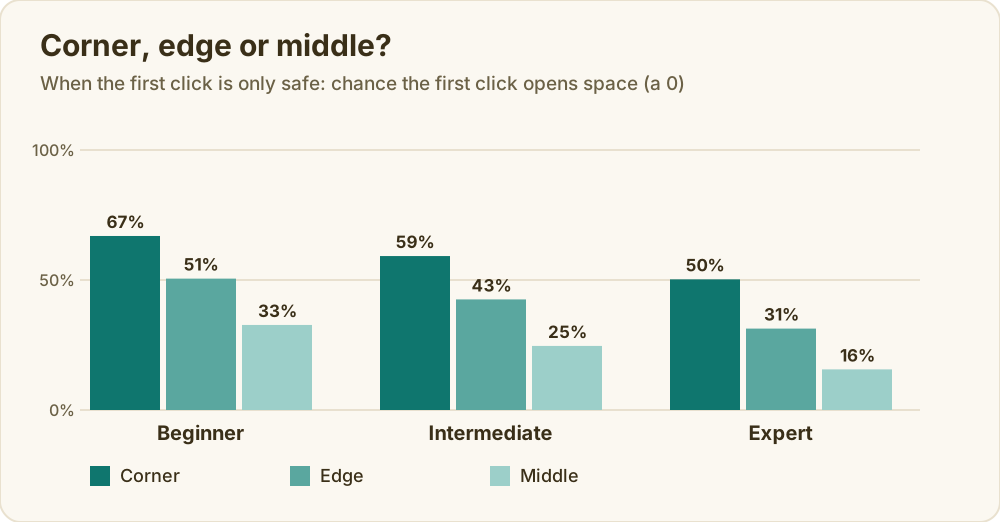
If your game only promises a safe first click (the classic Windows game and some clones), click a corner. A corner square has only three neighbours, so it is much more likely that none of them is a mine. On expert, a corner click opens a patch 50% of the time, the middle only 16%. On beginner it is 67% against 33%. Over whole games the corner wins more often too: 92% of beginner games against 87% from the middle, and 39% of expert games against 35%.
If your game always gives you a 0 (Google's Minesweeper and most Minesweeper websites), stay out of the corner. Every first click opens a patch now, and a 0 in the middle opens more of the board: on average 64 squares on intermediate against 27 from the corner. The bigger opening gives you more numbers to work with, and more boards end without a guess: 70% of intermediate boards from the middle against 58% from the corner. Final win rates end up close, 85% from the corner against 86% from the middle, because a careful guess later rescues many corner starts. The real gain from the middle is having to guess less often.
| Intermediate board, first click always a 0 | Corner | Edge | Middle |
|---|---|---|---|
| Squares opened by the first click (average) | 27 | 42 | 64 |
| Boards cleared with no guess | 58% | 68% | 70% |
| Games won | 85% | 87% | 86% |
If you do not know which rule your game uses, click the middle of the board once and see. If you keep getting a single number from the first click, your game uses the old rule, and corners are better.
How many guesses an expert game needs
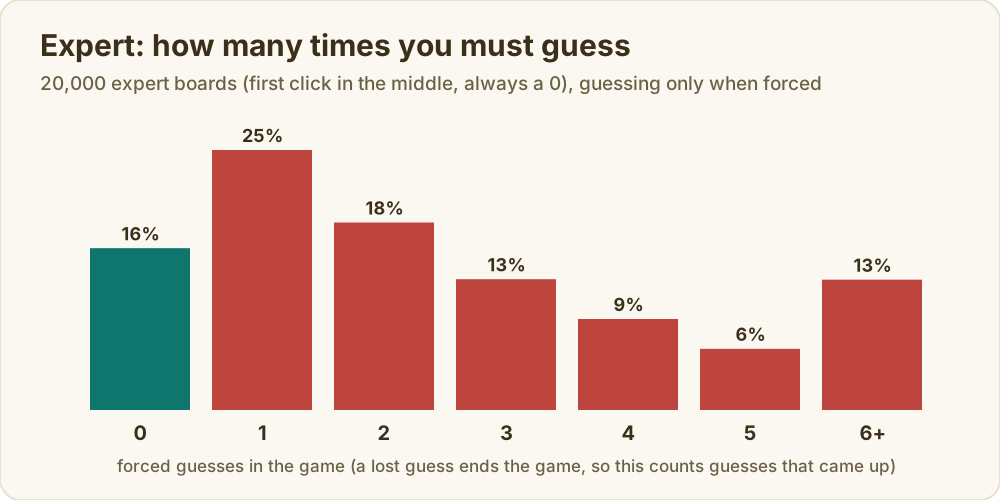
On expert with today's rule, only 16% of games need no guess. 25% need exactly one, and 40% need three or more. These counts include only the guesses the player got to make. A wrong guess ends the game, so a board that would have needed four guesses but went wrong on the second shows up as two.
A guess no one can avoid
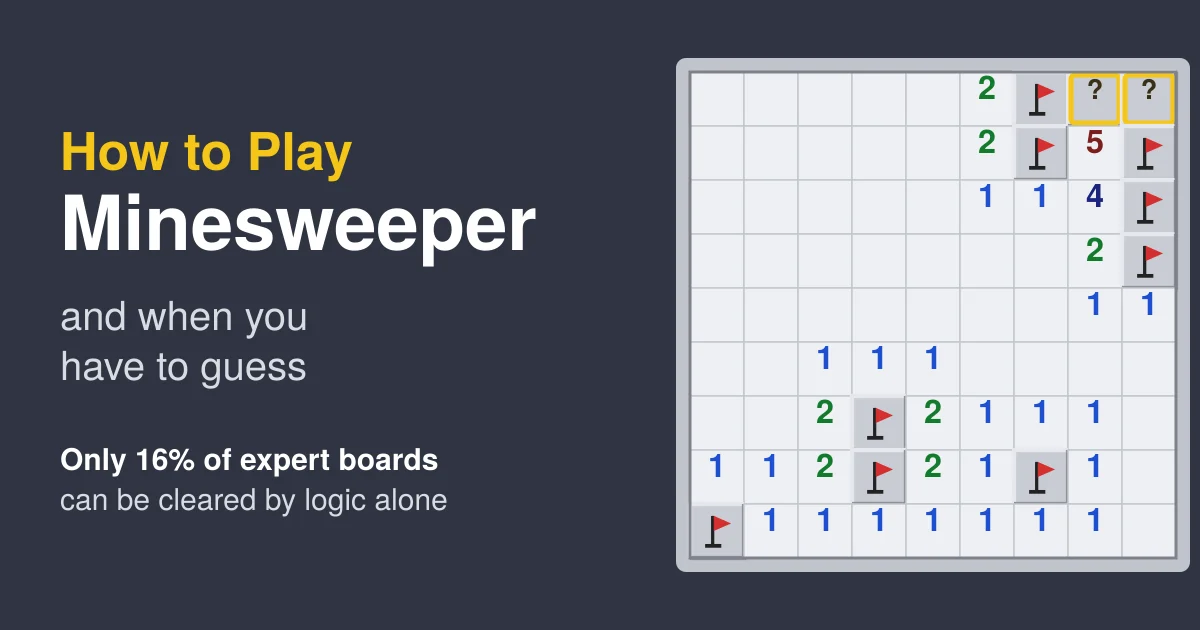
Here is the end of a real beginner game from our run, the moment the player got stuck. Nine mines are flagged. One is left, and it is under one of the two squares marked with a question mark.
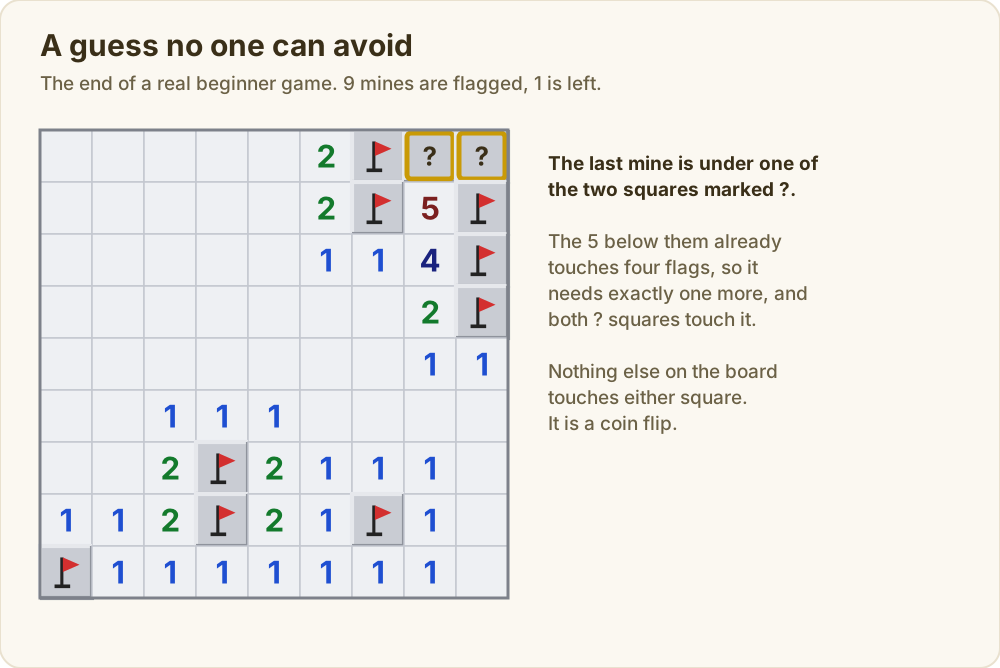
The 5 below them touches four flags already, so it needs one more mine, and both question mark squares touch it. No other number touches either one. Every way of reading this board says the same thing: one mine, two squares, no clue. You have to pick one, and you will lose half of the time. Players call this a 50/50.
Some modern versions, often sold as "no guessing" Minesweeper, only deal boards that logic can solve from the first click. If forced guesses bother you, look for that option. Ours is Mine Finder: every board can be cleared by logic, so a 50/50 like this one never comes up.
Tips that come straight from the numbers
- Work the easy rules first. Most moves are a number that is full (open the rest) or a number with exactly enough covered squares (flag them all).
- Look at pairs of numbers before you guess. The 1-1 and 1-2-1 patterns often open a spot that looks stuck.
- Count the mines left. Near the end of a game the mine counter can settle a spot that the numbers cannot.
- If you must guess, check the squares far from the numbers too. A covered square away from all clues has the average mine chance for the rest of the board, which can be lower than a risky square next to a number, and if it opens it gives you fresh clues.
- Pick the first click by your game's rule. Corner when the first click is only safe, middle when it is always a 0.
Where Minesweeper came from
Games about finding hidden mines go back to the mainframe days, but the version most people know was written at Microsoft by Robert Donner and Curt Johnson. It came out in the Microsoft Entertainment Pack for Windows in 1990 and was then included with Windows itself from Windows 3.1 on. Like Solitaire, it is often said to have been there to get people used to a mouse: left click to open, right click to flag, and the "chord", clicking both buttons on a full number to open everything around it at once.
If you like this kind of puzzle
Minesweeper is a logic puzzle in disguise, the same kind of reasoning you use in Sudoku and the Sudoku solving techniques guide, where every square is decided by what is around it. For more games that reward careful thinking over luck, see our list of the best brain training and logic games. For a tile game where the order of your moves decides the result, our Mahjong Solitaire guide tests the usual tips on 20,000 computer-played boards. If you would rather play with words, Pairdle is the daily word game we make.
Related articles
How to Play Tic-Tac-Toe, and How to Win (or Never Lose)
The rules of tic-tac-toe, the best first move, the only safe replies, and how to win more often, from all 255,168 possible games worked out by computer.
Amaze Go: Addictive and Frustrating in Equal Measure
A board full of twisting arrows, three lives and one job: send each arrow off the board without hitting another. Relaxing until you overlook something.
How to Play Riddlok - Exciting new puzzle game!
Riddlok is a free daily word puzzle with three routes to one answer — a riddle, a set of clues, and a hidden theme linking the clue answers.